Adjusters spend three months learning CCC ONE. Most shop estimators get two days. That gap isn't an accident, and it shows up every time an adjuster questions a line item, requests documentation that's buried in your attachments, or simply approves a lower number because nothing in your estimate pushed back.
The platform isn't neutral. CCC ONE's default settings are configured to produce estimates that protect the insurer's cost position. But the same system has tools built into it that, when used correctly, make your estimates very hard to challenge. Most shops never touch them.
Why Most CCC ONE Estimates Get Challenged
When an adjuster opens your estimate, they're looking for friction. Missing justification, unsupported labor times, operations without documentation. Every gap is an opportunity to reduce or delay payment.
The default CCC ONE estimate is a clean, line-by-line list. It tells the adjuster what you're billing. It doesn't tell them why. And critically, the labor footnotes that CCC ONE attaches to each line item internally, the ones that explain what's included and what's not, do not print on the estimate the adjuster receives. They see the number. They don't see the MOTOR guide footnote that supports it.
That's not a bug. That's the default. And it's working against you on every RO you submit.
The labor footnotes inside CCC ONE don't print on the adjuster's copy unless you put them there yourself.
The Line Notes Technique That Turns a 2-Page Estimate Into a 5-Page Proof Package
This is the single highest-value habit you can build in CCC ONE, and most shops don't know it exists.
Every line item in CCC ONE has a line notes field. Right-click any line, drop down to line notes, and you can type or paste text directly into that field. When the estimate prints, those notes appear inline, directly below the line item they're attached to. The adjuster sees your justification on the face of the estimate. They don't have to open an attachment. They don't have to request documentation. It's right there.
What goes in the line note? The justification for the operation. For a color, sand, and buff on a 2023 Kia Telluride hood, a line note that reads: "Feather, sand, and block required. Labor to wet sand and polish finish. Clear coat imperfection is not part of the standard refinish allowance. This is especially critical on large horizontal panels like the hood where dust and nib contamination is common during the spray process." That line note doesn't add to your attachment file size. It doesn't require the adjuster to cross-reference anything. It makes the case right on the page.
The practical effect: a 115-line estimate with line notes on every documented operation becomes a 300-line document when printed. An adjuster with 20 other estimates to process that day looks at your file and makes a judgment call. These people know what they're doing. Spot check, approve, move on.
What to put in each line note
The justification should answer three questions: what is the operation, why is it required, and what supports that requirement. For not-included operations, that support comes from the OEM procedure, the MOTOR guide, or a DEG inquiry response. For standard operations with a documentation gap, it can be as simple as the MOTOR guide footnote that the adjuster's copy doesn't show by default.
Some specific examples of what belongs in line notes:
Color, sand, and buff: cite the refinish guide and explain why the panel finish requires it
Seam sealer: reference the OEM procedure requiring application after any structural repair
Battery disconnect and reconnect: note the OEM reset and reprogram procedures triggered by this operation
Pre- and post-repair scan: cite the OEM requirement by vehicle make and model year
Weld setup and test: note that this is required prior to structural welding and reference the photo number in your file
The MOTOR Guide Footnote Paste: Two Clicks, Free Documentation
Here's a specific CCC ONE technique that almost nobody uses, and it's built right into the platform.
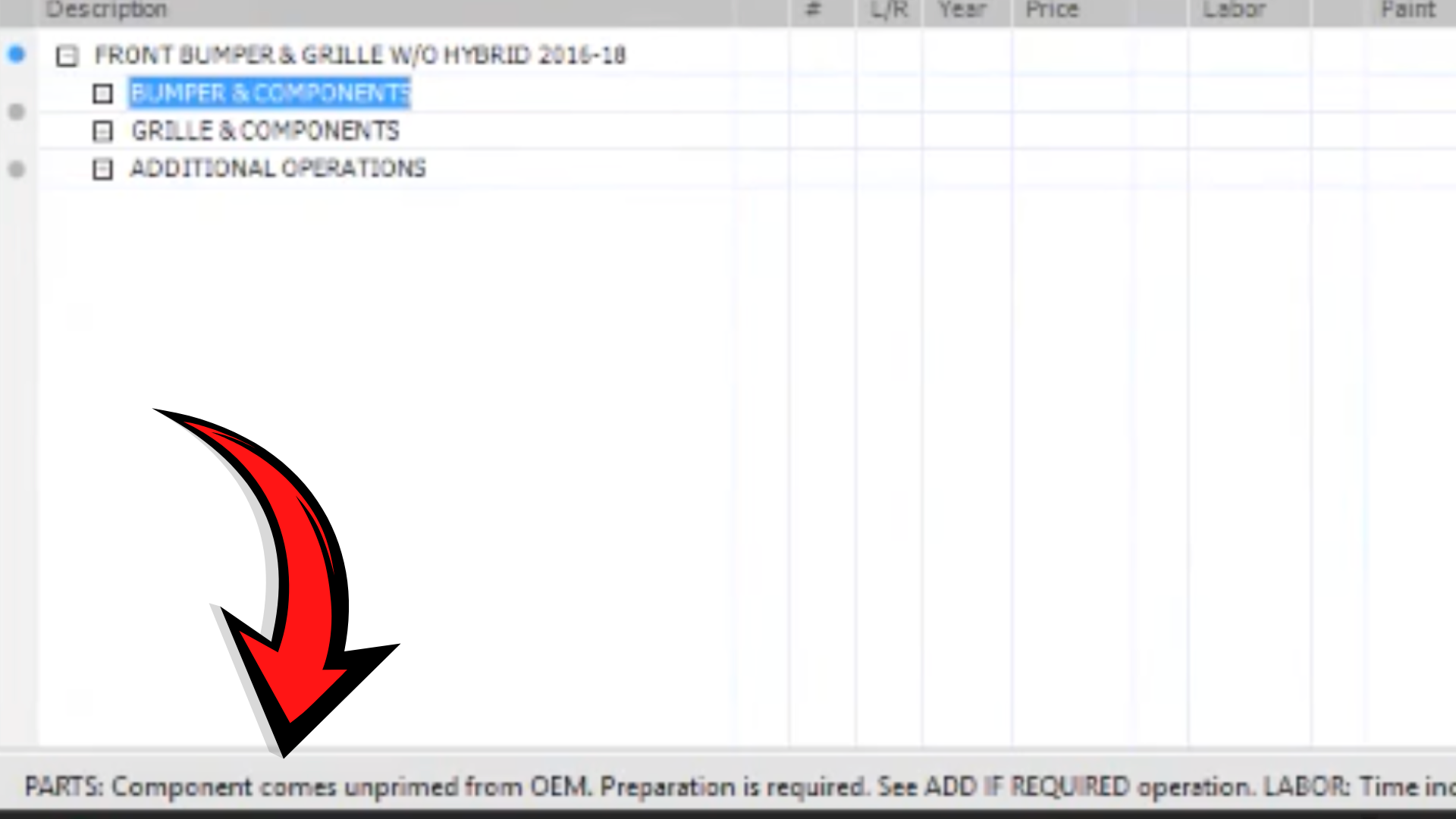
When you add a line item to your estimate, look at the bottom-left section of the screen. CCC ONE displays footnotes from the MOTOR guide for that operation: whether the time is for both sides, what's included in the labor, what single-use parts or clips are required, and what conditions apply to the time shown. That information is visible to you inside the platform. It does not appear on the printed estimate.
In CCC ONE, when you go to the line notes field for that operation, there's a "paste line note" option. Selecting it pulls the MOTOR guide footnote directly into the line note for that line item. One click. The footnote now prints on the face of the estimate. The adjuster sees the same MOTOR guide data you see. It's very difficult for an insurer to dispute a labor time when the justification comes from their own platform's underlying data.
This is especially useful for single-use parts and clips. The MOTOR footnote will tell you how many clips are required, that they're single-use, and that replacement is mandatory. Paste that into the line note. Now the adjuster's copy says the same thing. That stops the "we don't pay for clips" conversation before it starts.
The MOTOR guide footnotes visible at the bottom of CCC ONE. This information doesn't print on the estimate the adjuster receives unless you paste it into line notes.
Labeled Photos Tied to Line Items, Not Just Uploaded
Photos in attachments don't work. An adjuster with a large file is not going to scroll through 40 unlabeled images looking for the photo that justifies your structural sectioning charge. They'll request the documentation again, delay the claim, or reduce the line item.
The fix is simple and it belongs in your line notes. When you photograph hidden damage, label each photo at the time you take it: "Photo 7: rear lower rail impact damage, 14 inches forward of bumper attachment point." Then reference that photo number in the line note for the corresponding line item. "See Photo 7 for documentation of rear lower rail damage requiring sectioning per OEM procedure."
Now the adjuster has a direct path from the line item to the proof. They don't have to search. They don't have a reason to push back. Write the estimate like someone is going to audit it in front of a judge. If the documentation wouldn't hold up in arbitration, it's not ready to submit.
The Labor Assignment Work Order: Your Internal Quality Control
Once your estimate is built with line notes, CCC ONE has a feature most shops ignore entirely. Under print options, you can print a work order by labor assignment. This generates a separate document for each labor category: body, refinish, mechanical. Each technician gets their specific operations, their assigned hours, and any line notes attached to those operations.
The practical value here is twofold. First, your technicians aren't reading a full estimate and trying to figure out what applies to them. They have a clear list. Second, the line notes you wrote for adjuster justification now double as technician instructions. A note that says "photograph weld test plate before proceeding" becomes part of the body tech's work order. The documentation that protects your billing also drives your process.
If a tech completes a repair without a required photo, it's a missed documentation opportunity that you can't recover. Building the photo requirements into the work order closes that gap before the vehicle leaves the bay.
The Bottom Line
CCC ONE is the platform most of your estimates run through, and it's configured by default to produce documents that are easy for adjusters to challenge. The line notes field, the MOTOR guide footnote paste, labeled photo references, and the labor assignment work order are all built into the platform. None of them require additional software. They require discipline and a decision to build estimates that function as evidence packages, not just line-item lists.
Shops doing this consistently report fewer change requests, faster approvals, and adjusters who stop pushing back because the pattern of documentation tells them it's not worth the attempt. For shops that want a faster way to identify which operations belong in those line notes and which not-included operations are missing from their estimates entirely, tools like Estimate Optimizer™ scan each estimate against OEM databases and surface those gaps automatically, so estimators spend their time on documentation rather than research.
What are line notes in CCC ONE and how do they help with insurance approvals?
Line notes are a field attached to each line item in a CCC ONE estimate that prints directly on the estimate the adjuster receives. Adding justification text to each line note puts your documentation inline on the face of the estimate, so adjusters see your reasoning without having to request separate documentation. Estimates with thorough line notes are significantly harder to push back on because the justification is already answered before the adjuster can ask.
Do labor footnotes from the MOTOR guide appear on the estimate an adjuster receives?
No. By default, MOTOR guide labor footnotes are visible inside CCC ONE but do not print on the estimate. To get that information in front of the adjuster, you need to paste the footnote into the line note field for that operation. CCC ONE has a built-in paste function that copies the MOTOR footnote directly into the line note with one click.
How should I document photos to support a supplement in CCC ONE?
Label every photo at the time you take it with a specific description and number. Then reference that photo number in the line note for the corresponding line item on your estimate. For example, a line note for a structural sectioning charge might read: 'See Photo 7 for documentation of rear lower rail damage.' This creates a direct path from the line item to the proof, removing an adjuster's ability to request documentation they claim wasn't provided.
What is a labor assignment work order in CCC ONE and should shops be using it?
A labor assignment work order is a print option in CCC ONE that generates separate documents by labor category, giving each technician their specific operations, hours, and any line notes attached to those items. Shops should be using it. It eliminates the problem of technicians reading a full estimate and missing operations, and it turns your adjuster-facing documentation into internal process instructions at the same time.